
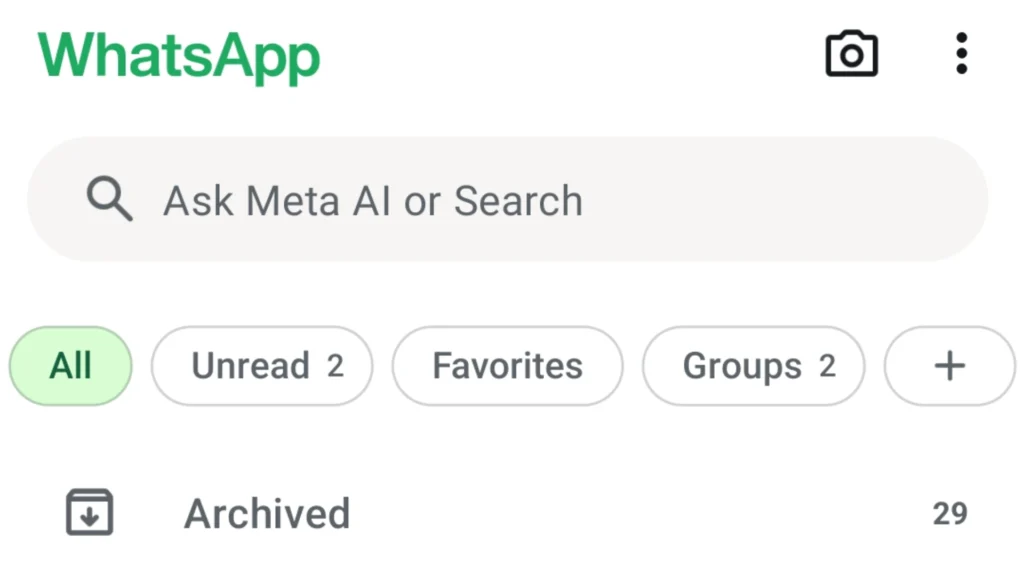

WhatsApp is now even more convenient to use thanks to a feature that allows users to separate personal chats from group chats. The process is simple, making it accessible for anyone who wants better control over their messaging experience. If you’re looking for how to separate WhatsApp chats, this guide explains everything clearly.
The Function of the List Feature in WhatsApp
Previously, WhatsApp only offered three filter options: All, Unread, and Favorites. With the introduction of the List feature in 2024, users can now create custom categories that fit their needs. These categories might include Family, Friends, Work, or anything else you want to organize.
This makes conversations easier to manage because every message is grouped based on its category. It’s especially useful for users who handle many active chats and want a cleaner, more organized messaging interface.
How to Separate WhatsApp Chats Using Lists
Before using the List feature, make sure your WhatsApp app is updated to the latest version. Then follow these steps:
- Open the WhatsApp application.
- At the top, swipe through the categories (Unread, Favorites, Groups) until you find the “+” icon.
- Tap the “+” icon.
- Enter a List name based on your needs.
- Select Add people or groups.
- Choose the contacts or groups you want to include.
- Tap the checkmark in the bottom right corner to save.
Once the List is created, you can edit it anytime. Simply tap “Manage [List Name]” at the bottom of the List to rename it, add or remove members, or delete the List entirely.
Conclusion
The List feature in WhatsApp makes it easier for users to separate different types of conversations, whether personal chats or group messages. By using this feature, communication becomes more organized and efficient. For anyone wondering how to separate WhatsApp chats, this method is one of the best ways to keep your chats neatly structured.